Many small service businesses handle calls reasonably well during business hours. The problem is that high-value calls rarely arrive at convenient times. They come in at 8 p.m. when a homeowner’s AC stops working, on Saturday morning when a pipe bursts, and during the busiest weeks of the season when your crew is already stretched across three jobs. That’s when calls go to voicemail, and that’s when the competitor who does answer books the job instead of you. An AI answering service for small business is built precisely for this gap: it captures the calls your team can’t get to and turns them into booked jobs before the caller moves on.
Rather than adding headcount, this infrastructure layer sits between your inbound calls and your calendar. It can answer calls around the clock, qualify callers, book appointments, and log records, without a human receptionist on staff. AnswerCapture is built around this model: a done-for-you revenue capture system that applies emergency-response discipline to inbound call handling for service contractors.
By the end of this guide, you’ll have a clear framework for shortlisting two or three AI call answering services matched to your industry, budget, and tech stack, along with the questions to ask before signing anything.
How an AI answering service for small business actually works
Most owners picture a clunky phone tree when they hear “automated phone answering.” The reality is closer to a real-time call-to-job pipeline that handles the entire interaction without human intervention. Modern AI phone receptionists handle accents, interruptions, and off-script questions far better than earlier versions did, and the gap between them and a live receptionist has narrowed considerably in recent years.
What happens from the moment a call comes in
The AI picks up immediately, identifies the caller’s intent through natural conversation, and responds appropriately. If it’s a new service request, it moves into the booking flow. If it’s urgent, it escalates based on priority routing rules you set during implementation. Contrast that with what happens when no one answers: the caller hangs up, searches for a competitor, and often contacts another vendor within minutes. That window between “unanswered” and “lost forever” is smaller than most owners realize.
From answered call to booked job: the booking loop
Real-time booking means the AI checks your calendar availability, confirms the appointment with the caller, and writes the record directly to your CRM, all in a single interaction. No callback required. No message to return. No job that falls through a crack in your voicemail. This no-touch booking model is where a substantial portion of the revenue currently slipping through voicemail gets recovered, and it’s the core mechanic that separates a real AI receptionist from a basic auto-attendant.
Why the setup model matters as much as the software
There’s a meaningful difference between self-configured AI tools and done-for-you systems. A business owner who is already running three jobs in the field has no time to configure call flows, write scripts, or troubleshoot API integrations. For most service companies, the deciding factor isn’t the feature list. It’s whether someone else handles implementation and keeps the system running.
The real cost of answering calls without dedicated staff
The financial case for an AI virtual answering service becomes clear once you put numbers beside the status quo. Hiring a full-time receptionist feels like the straightforward solution, but the math rarely works out in favor of headcount at the volume most small service businesses operate.
What a full-time receptionist costs in 2026
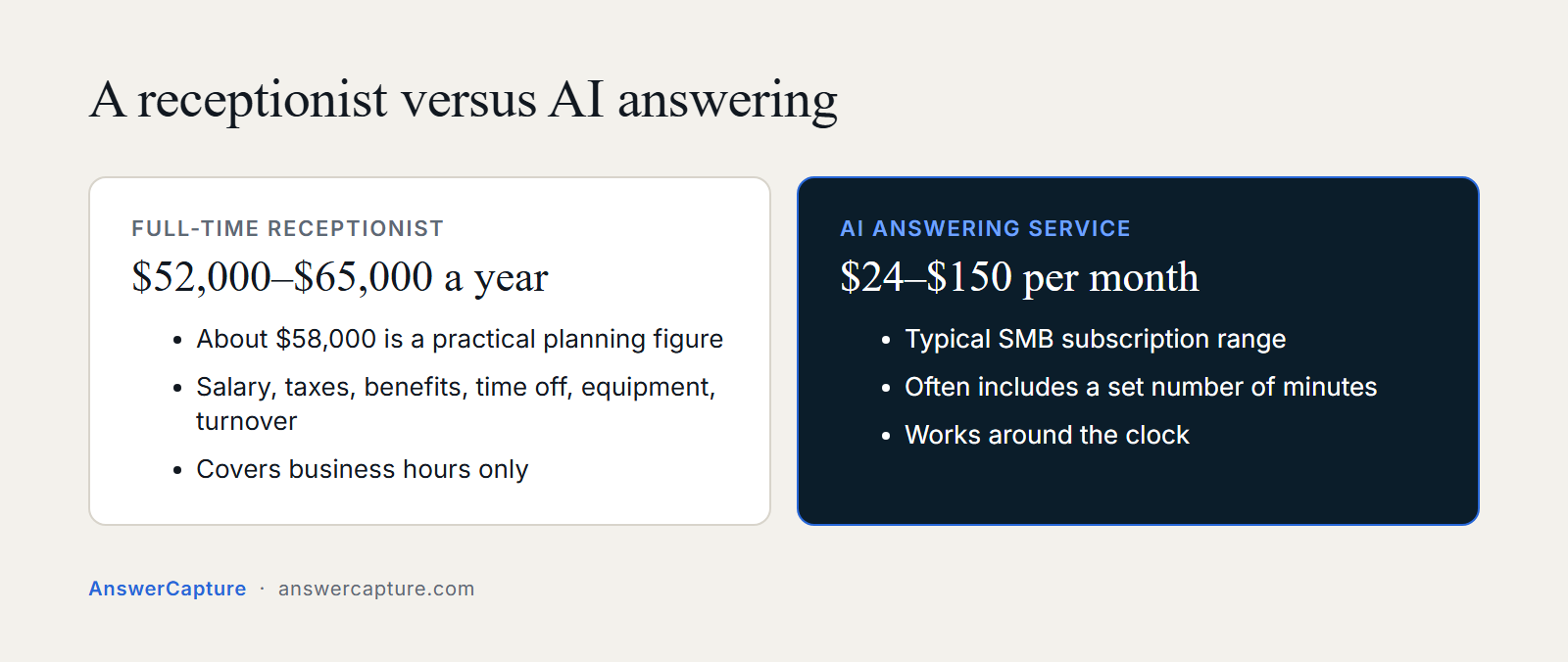
The fully loaded annual cost of a full-time receptionist for a small U.S. business runs roughly $52,000 to $65,000 per year, consistent with current BLS wage data and employer cost estimates, with a practical planning figure around $58,000 when you include salary, payroll taxes, benefits, paid time off, equipment, and turnover costs. That number covers business hours. It does not cover evenings, weekends, or the surge demand that hits HVAC companies in July and plumbers in January.
The pricing models AI services actually use
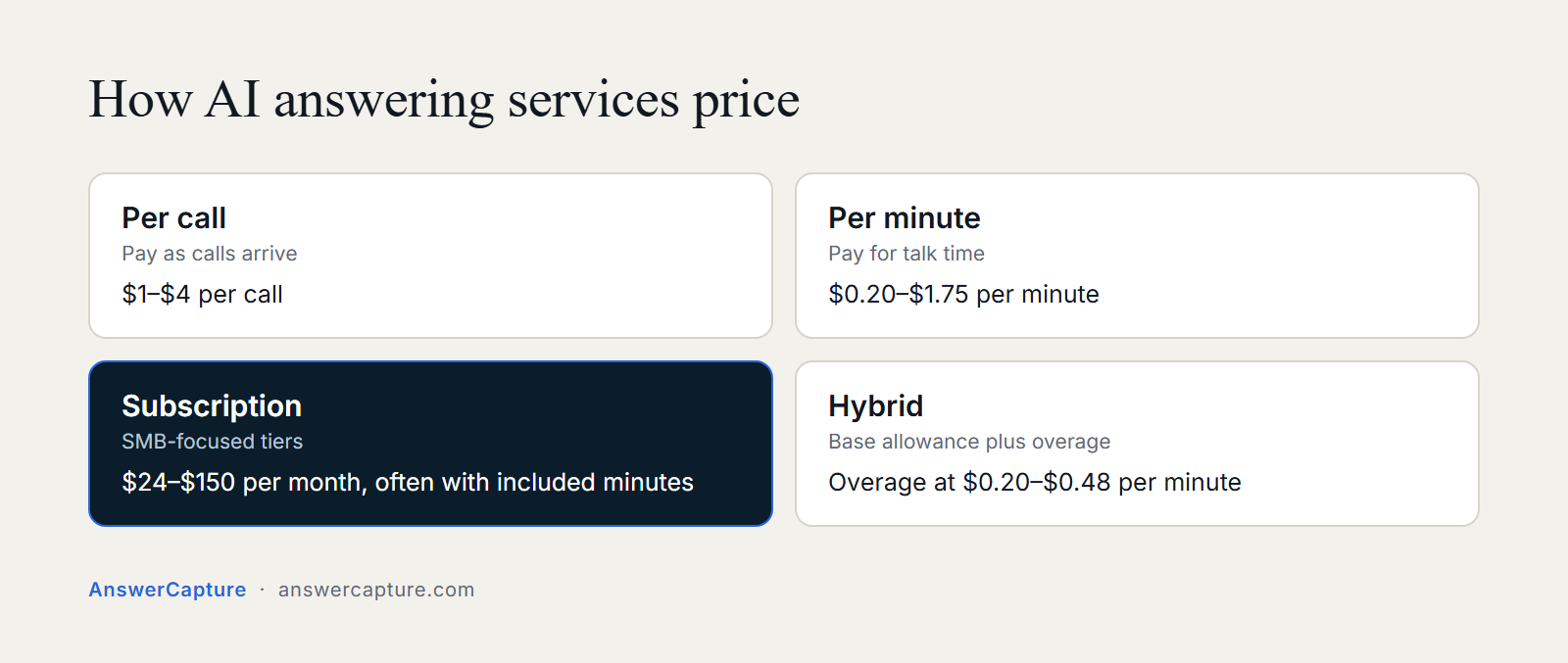
AI virtual receptionist services use four main pricing structures. Per-call pricing runs roughly $1 to $4 per call. Per-minute pricing typically lands between $0.20 and $1.75 per minute. Subscription tiers for SMB-focused plans range from about $24 to $150 per month, often with a set number of included minutes. Hybrid plans bundle a base allowance and then charge overage fees at $0.20 to $0.48 per minute when you exceed it. For a business averaging 200 inbound calls per month, most AI-only plans land between $100 and $300 per month. Run the math at your actual call volume, vendor sample scenarios are built around median usage, not yours.
The calculation most owners skip: cost of a missed call
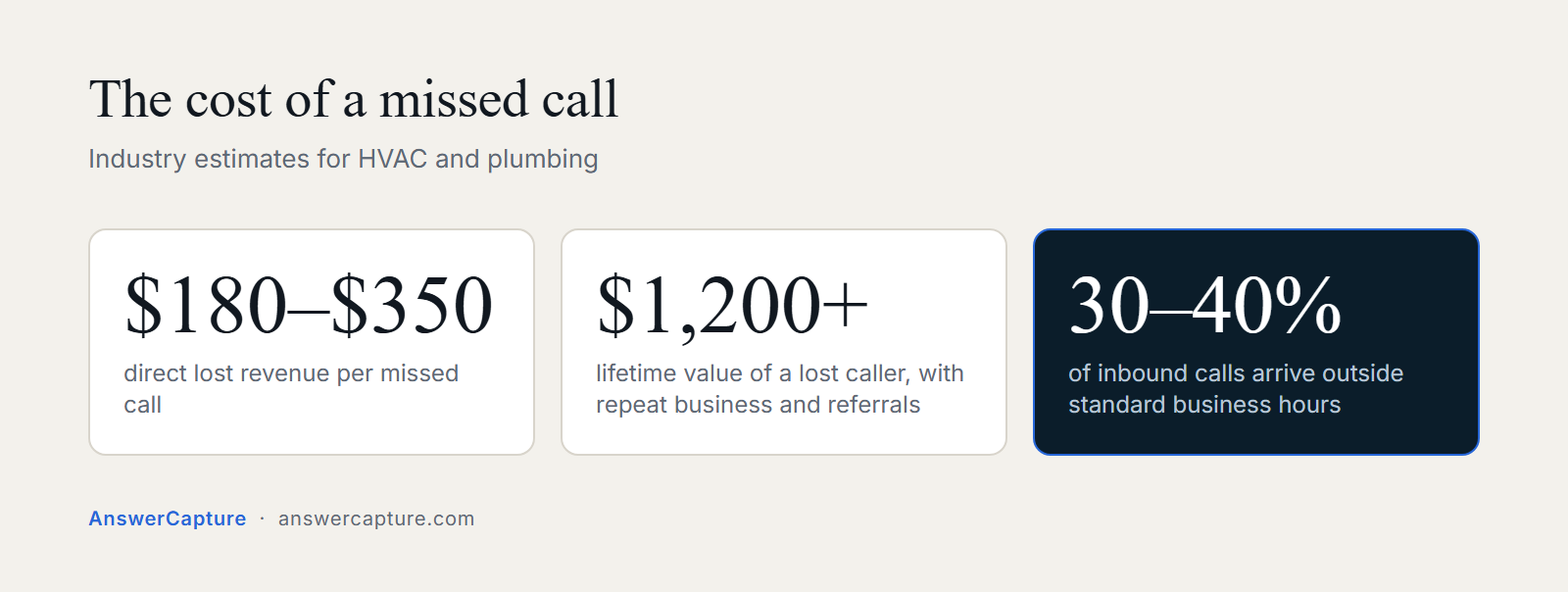
Industry estimates for HVAC and plumbing put direct lost revenue at roughly $180 to $350 per missed call, with lifetime value, including repeat business and referrals, potentially exceeding $1,200 per lost caller depending on your average job size and retention rate. If your business misses even five calls a week, the monthly revenue leak likely dwarfs the cost of any automated call handling solution on the market. The missed call isn’t an operational annoyance. It’s a measurable revenue event, and it happens every time your phone goes to voicemail.
24/7 call capture and automatic booking without adding headcount
After-hours coverage is where the conversion gap lives. Industry data consistently shows that 30 to 40 percent of inbound call volume arrives outside standard business hours, and many of those callers don’t leave a voicemail, they move on to the next number in their search results.
After-hours is where most revenue leaks out
Service calls spike when people get home from work, when systems fail on weekends, and when seasonal demand surges faster than any team can absorb. Most small businesses go dark at 5 p.m. The competitor who answers at 8 p.m. books the job. One contractor-focused industry study found that 84 percent of calls went unanswered after 5 p.m. and on weekends when no answering service was in place. That figure alone makes a strong case for after-hours coverage.
What real-time automated booking looks like in practice
A homeowner calls at 9 p.m. about an AC that stopped working. The AI answers immediately, confirms the service type and location, checks the technician’s schedule, books the appointment, and sends a confirmation text. The owner wakes up to a job on the calendar they never had to touch. That’s what automated call handling at its best actually produces: booked revenue from calls you would have missed entirely.
AnswerCapture: done-for-you call infrastructure for service businesses
AnswerCapture is built specifically for service contractors who are already generating inbound demand but converting only a portion of it because calls go unanswered. AnswerCapture handles inbound calls so that every call is answered, every lead is logged, and every appointment is booked in real time. The system sits invisibly between your incoming calls and your calendar, handling the full call-to-job pipeline without placing any technical burden on you. Owners who want to see the system in action before committing can request a live call demo and hear it handle a real service call.
How to shortlist the right AI answering service for small business use cases
The market for intelligent answering services has expanded quickly, and most vendors make similar claims. The way to separate good systems from great ones is to demand specific metrics, verify integrations before signing, and match the vendor’s model to your actual operational situation.
The metrics that separate good systems from great ones
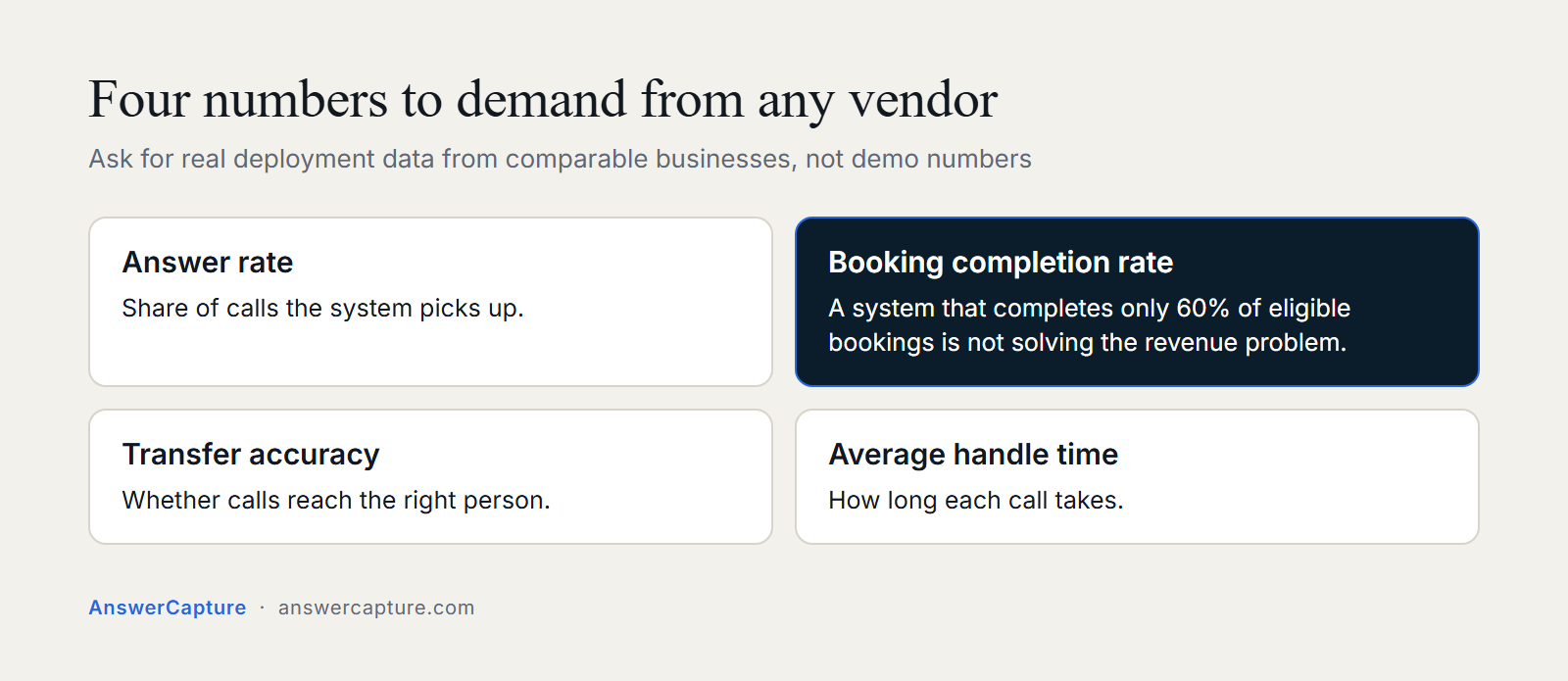
Four numbers are worth demanding from any vendor: answer rate, booking completion rate, transfer accuracy, and average handle time. A system that answers every call but completes bookings on only 60 percent of eligible appointments is not solving your revenue problem. Require vendors to define these metrics precisely and show real deployment data from comparable service businesses, not demo numbers or cherry-picked case studies.
CRM and calendar integrations you need to verify before signing
Most small service businesses use Jobber, Housecall Pro, or Google Calendar at minimum; many also use ServiceTitan, FieldEdge, or HubSpot. Verify whether the vendor handles integration setup or leaves it to you. The typical integration path involves OAuth authorization, field mapping, and workflow triggers that write call outcomes back to your CRM. For service companies without an IT team, the difference between a native integration and an API-only option is often the difference between a working system on day one and a stalled project that never gets finished.
The shortlist by use case
For low-cost general AI answering, AIRA at $24.95 per month covers the basics. Rosie AI and Goodcall work for local service businesses that need functional call flows without heavy technical lift. Smith.ai suits businesses that want a human backup layer for complex calls. AnswerCapture is positioned for service contractors who want a fully done-for-you revenue capture infrastructure rather than a software subscription they manage themselves. The distinction matters: AnswerCapture’s focus on revenue capture rather than call answering targets the conversion gap directly, not just the coverage problem.
Understanding pricing before you commit to any AI answering plan
Pricing structures in this category can hide real cost exposure if you don’t run the math at your actual volume. The goal here is to give you enough literacy to evaluate plans accurately before a sales conversation, not after.
Per-call vs. per-minute vs. subscription: what the math looks like
A business averaging 200 calls per month at three to five minutes each will spend very differently depending on the pricing model. Subscription plans from $24 to $150 per month often include a set number of minutes; overage runs $0.20 to $0.48 per minute on most SMB-tier plans. Per-call pricing at $1 to $4 per call can escalate quickly during high-volume months. Model your costs against your actual call volume and average call length, not a vendor’s median-usage scenario.
What seasonal businesses need to watch for
HVAC and plumbing businesses see call volumes triple during peak season. A plan priced for 150 calls per month hits overages hard in July and January. Ask every vendor how they handle surge volume and whether they offer seasonal plan flexibility or cap usage in ways that would cut off calls during your busiest weeks. A system that stops answering because you’ve exceeded your plan limit during a summer heatwave is worse than no system at all.
How to trial an AI answering system and know if it’s working
A 30-day trial typically gives you enough data to evaluate a system objectively, assuming your call volume is steady enough to generate a meaningful sample. Seasonal businesses may need a longer window. Either way, the quality of the evaluation depends entirely on tracking the right numbers from day one. Most owners check whether the phone got answered. That’s not enough.
The three numbers that prove a system is working within 30 days
Track answer rate (what percentage of inbound calls were captured before abandonment), booking completion rate (what percentage of eligible calls ended in a confirmed appointment), and call-to-revenue attribution (how much booked revenue traces directly to captured calls). These three numbers tell you whether the system is closing your revenue gap or just answering the phone, and that distinction is the entire point of the investment.
How to run a trial without disrupting your existing workflow
Forward calls to the AI system for a defined period, keep your existing process as a fallback, and compare booked jobs versus missed calls week over week. Many reputable virtual receptionist platforms offer a trial or demo window, confirm the specifics with each vendor before committing. AnswerCapture takes a direct approach: the live call demo lets owners hear the system handle a real service call before any commitment is made, so you know exactly what your callers will experience before the first real job gets booked.
The gap between calls received and jobs booked is where the growth is
A small service business rarely needs more leads to grow revenue. It needs to convert more of the demand it already has. The math is straightforward: if your business generates 200 inbound calls per month and currently converts 60 to 70 percent of them, a reasonable baseline for businesses that answer most calls during business hours, closing that gap to 85 to 90 percent adds meaningful booked revenue without spending another dollar on advertising.
An AI phone receptionist running 24/7 works on that gap continuously. It answers the call at 9 p.m. and books the appointment before the caller moves on. It logs every interaction so you have full visibility into what’s being captured and what’s still leaking. The framework in this guide gives you the metrics to demand, the integrations to verify, and the shortlist logic to match vendors to your actual use case.
Choosing the right AI answering service for small business comes down to one question: does the system close your conversion gap, or does it just pick up the phone? If you operate a service business and want to see what revenue capture infrastructure looks like in practice, AnswerCapture’s live call demo is the fastest way to evaluate it. You hear the system handle a real service call, ask questions about how it fits your workflow, and decide from there. No technical setup required on your end. That’s the done-for-you model in action.